New Year, Fresh Instagram Bio
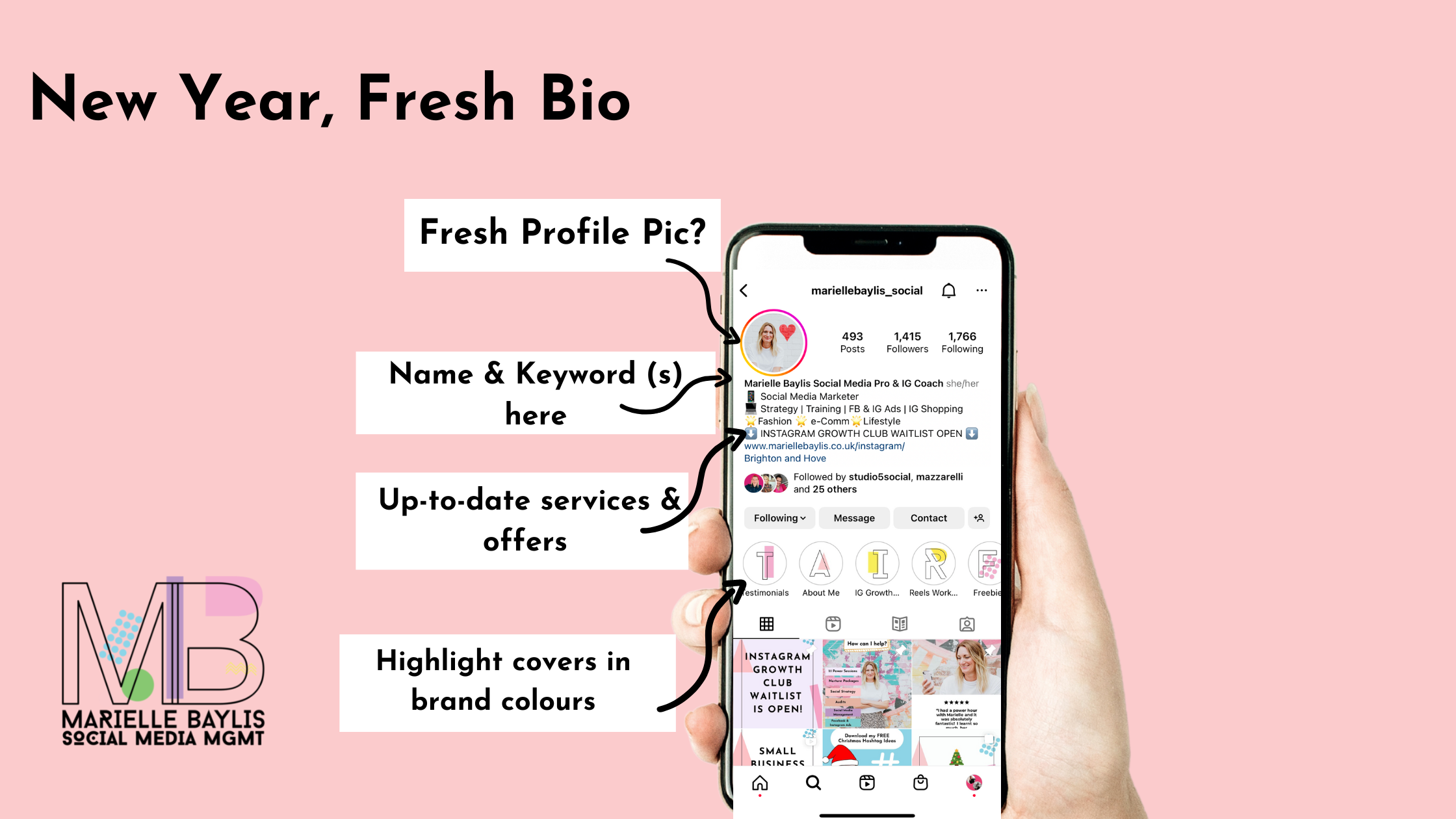
As we prepare to step into the new working year, it’s the perfect time to revisit your Instagram bio and give it a little refresh.
January is a great time to check in with your Instagram bio and make sure it's up to date with all your latest business info. You want new profile visitors to immediately understand what you do, who you serve and how you can help.
Here is a quick checklist:
Profile Pic
Do you have more recent photos of yourself or a new logo? If so, an update could give your profile a fresh new look.
If you are a business then a logo might suit your brand best.
If you are a personal brand and you are the face of the business it may be best to use a photo of yourself.
A clear head and shoulders shot with good lighting. Ideally, it will be in keeping with your branding and account aesthetic.
It’s really easy to change your profile picture. Simply click on the ‘Edit Profile’ button on your Instagram profile, click ‘Change profile photo’ in blue text underneath your current image and upload your new photo. Click done, et voilà.
Name
The ‘Name’ of your Instagram profile appears in bold copy in your bio and is searchable. It’s important to maximise this feature as much as possible. Make sure you include your name & a few keywords about what you do. This will improve your chances of showing up in more search results.
For instance: Natalie Wedding | Make-Up Artist
Your name is limited to 64 characters, including spaces.

Pim Pam’s Name can be seen here in bold text reading ‘Pim Pam Cloth Nappies’. By including the words ‘Cloth Nappies’ in the Name, this profile has more chance of users knowing what they sell straight away. In addition, they are more likely to show up in relevant search results.
Services
Are all your latest services or products mentioned in your bio? Have you launched any new services or products recently/ Update your bio with any new products/services/offers you have this year.
Bear in mind that your bio character limit is 150 characters, so you will need to be concise and straight to the point with your sentences.
Links
Is the web link in your Instagram bio correct and working? Think about where you want to direct people.
If you use Linktree or a similar multi-link service, double-check your links are current and up-to-date. Get rid of any old links that are obsolete. A bit of housekeeping here for the New Year is always a great idea.
A recent update is that you can now add your Facebook link to your Instagram bio. But annoyingly this currently only allows you to add your personal Facebook profile and not your business page. So it’s not as useful as it could be yet. Hopefully this changes soon to allow Facebook page links.
Highlight Folders
Ensure you have a selection of Highlight folders that tell your businesses story and services well. A good selection to start with could include:
"SHOP" - If you have an Instagram Shop you can turn on Automatic Highlights for any stories with products tagged in them. Click here to learn more
ABOUT/WHAT WE DO
MEET THE TEAM
PRODUCTS/SERVICES
TESTIMONIALS/REVIEWS/STORIES YOUR CUSTOMERS HAVE TAGGED YOU IN
NEW COLLECTIONS
BEST SELLERS
Highlight Covers
Make sure you have highlight covers on all your highlight folders. These should ideally be in keeping with your branding and account aesthetics for visual appeal.
If you haven't made yours yet - hop over to Canva (free version available) and make them quickly using your own colours and fonts. Type ‘Instagram Story Highlight Cover’ into the search bar and you will be presented with various designs to choose from and amend to your liking.
How to upload a new highlight cover:
When you have finished designing they are ready for downloading to your phone (using the Canva app)
Head to an existing highlight folder on your Instagram profile
Click the 3 dots in the right-hand corner and a menu will appear
Click ‘Edit Highlight’
Click blue ‘Edit Cover’ text underneath the current cover image
Click the ‘Camera Roll’ icon to the left of the images (see image below)
You will then be able to choose your downloaded Canva design from your camera roll
When you have selected your image, click ‘Done’
Your new Highlight Cover will now be visible on your profile.
Add covers to all your highlight folders for consistency and a polished look.

The Camera Roll icon can be found here. Click here to upload new image from your camera roll.

Contact Details
Last but not least, double-check all the contact details for your account are still correct. The right phone number and email address are SUCH important bio features, you want these to be correct.
So these are the key things to check in order to give your Instagram bio a New Year facelift.
If you want to give your Instagram profile a ‘full works’ glow up then I offer a few freebies, services and courses that will help you achieve this:
Freebies:
Instagram Content Prompt Card - 30 days of post, reel and story ideas in a fun bingo card format
Instagram Shop Set Up Guide - Step-by-step PDF guide to setting up your Instagram Shop
Services
1:1 power session - where we can either spend an hour of training on a subject of your choice - ie Reels, content planning & strategy, Facebook and Instagram ads, Instagram Shopping etc.
Courses
Instagram Growth Club - A 3-week video-based course for Instagram beginners or seasoned Instagram users that need help rediscovering their IG mojo. We will show you everything you need to know to use Instagram confidently. You will learn how to build your community, brand awareness and increase those all-important sales.
I hope this has been helpful!
Marielle x