What To Do If Your Instagram Shop Is Rejected

Instagram shopping is a fabulous selling tool for businesses selling physical products on Instagram.
Every month, 130 million people tap on Instagram shopping posts. This is a huge figure and illustrates well how popular and powerful social shopping is.
With an Instagram shop enabled on your business or creator account, you can add product tags to your grid posts, stories, Reels, and Lives (if you have your in-app purchasing set up).
These tags, when tapped, will show product information such as product name and price. If tapped again, users will be directed to a product page that shows further product details and invites them to click through to the website to purchase. Great stuff, hey!
The images below show how Pim Pam has used this beautifully on their feed.

Pim Pam Nappies Instagram post with product tag for ‘Wild Little Thing’ Nappy
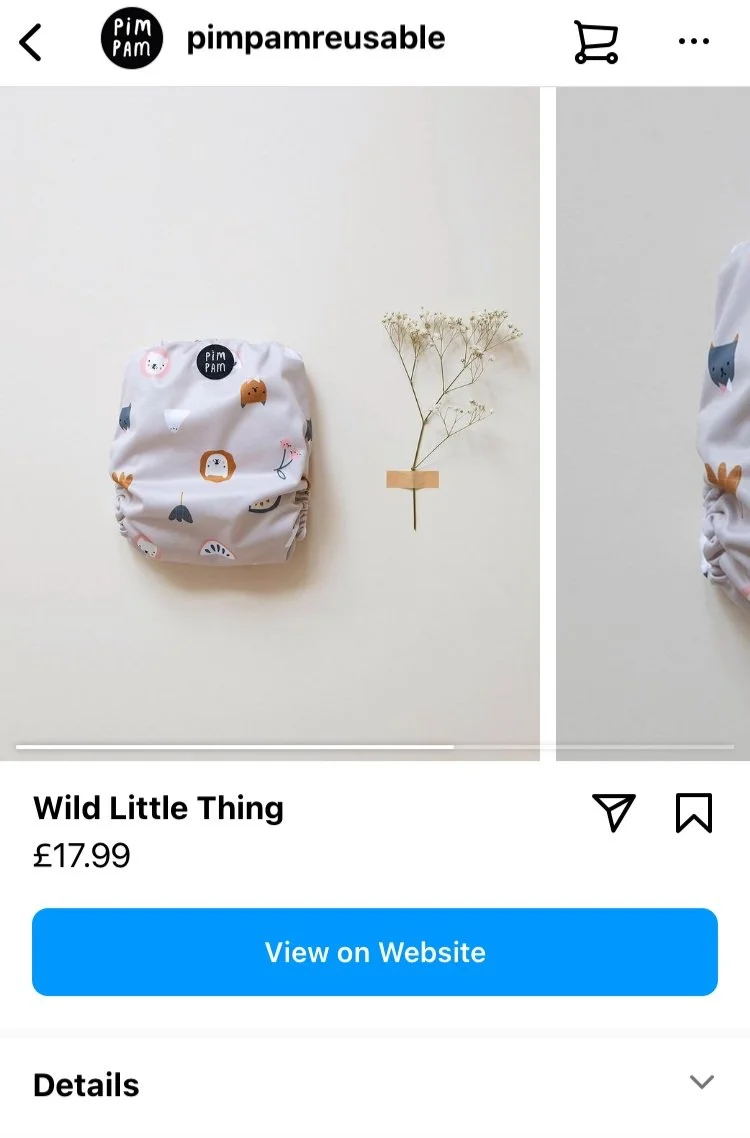
When you tap the post product tag you will be taken to the product details page.
Setting Up Your Instagram Shop
The initial process for setting up your shop is relatively simple. You will need to create or connect an existing product catalogue. Or you can connect via a Facebook Partner such as Shopify, BigCommerce, WooCommerce or Magento.
You will then be ready to submit your shop for review 🙌. You should know whether your shop is approved within 1-14 days (possibly longer).
If you need help getting your Instagram Shop set up in the first instance, head to my free download - How To Set Up Your Instagram Shop.
What If Your Instagram Shop Is Rejected?
If your initial application for an Instagram Shop is rejected, Instagram won't tell you exactly why. They will point you towards their Commerce Eligibility Requirements. You will need to check you adhere to all of these points. Then, and only then, will your Instagram Shop be approved.
The important thing to note at this point is that if your shop is rejected once, you have one more chance to re-apply and appeal. After a second review, it can take some time before getting another opportunity to apply. So it’s imperative you thoroughly check through these requirements before resubmitting. If no changes are made to improve your shop and set up, it’s highly likely your shop will be rejected again.
Initial Checks
There are several key points you must check first before hitting submit again. Checking and correcting any of the below, in my experience, have been instrumental in getting a rejected shop approved.
Initial checks include:
Compliance with Facebook Policies
Including Facebook's Terms of Service, Commercial Terms and Community Standards, and your Instagram professional account complies with Instagram's Terms of Use and Community Guidelines.
There are certain products you are not allowed to sell on Instagram which include items such as weapons, alcohol, medical or healthcare products. So you will need to check carefully that the product you are selling meets their strict requirements.
Have a physical product and a domain of active business
You may be asked to prove you own your domain by completing the Domain verification process. In addition, make sure that your website has a Privacy Policy and clear details of your Returns and Refund Policy.
Be located in a supported market
You can check supported markets for Commerce surfaces on Facebook here. Supported markets for Instagram Shopping can be found here.
Demonstrate Trustworthiness
In other words, have a considerable business presence. You will need to prove that you are a trustworthy and authentic business. Your Instagram and Facebook accounts should be linked and have all the relevant information fields thoroughly filled out. Make sure you have completed the following:
Profile & banner images
Give full and accurate business details
Privacy Policy Added (Facebook Page Info)
Post consistently to your social channels
Have an authentic and growing audience, on both Facebook and Instagram platforms, which engage with your content. If your account is very new, you may need to give your accounts time to grow before approval will be granted. There is no defined timeframe or follower count given by Instagram. If you have a new account, perhaps wait a while (min 30 days) before going to appeal to give your accounts time to prove trustworthiness.
Follow best practices
You’re Ready To Re-Submit
Hit the submit button and wait approximately 1-14 days again (may take longer). As long as you adhere to all the above, your Instagram Shop should be approved.
You will know you are approved when you are invited to ‘start tagging products’ in the Instagram app. Hooray! You’ve done it.
You now can tag your products in all of your Instagram posts and drive traffic to your website and increase sales 🙌.
What If Your Shop Is Rejected Again?
If your Instagram Shop is rejected again you may have to wait to be invited to apply again.
If after a month or so you have not received an invitation to re-apply, you can get in touch with the Facebook Shops Team via the help button in Commerce Manager (see images below for instructions). The aim here is to request a manual review by a Facebook representative. I advise choosing the Messenger chat option which allows you to chat in real-time and send screenshots of items you are discussing.
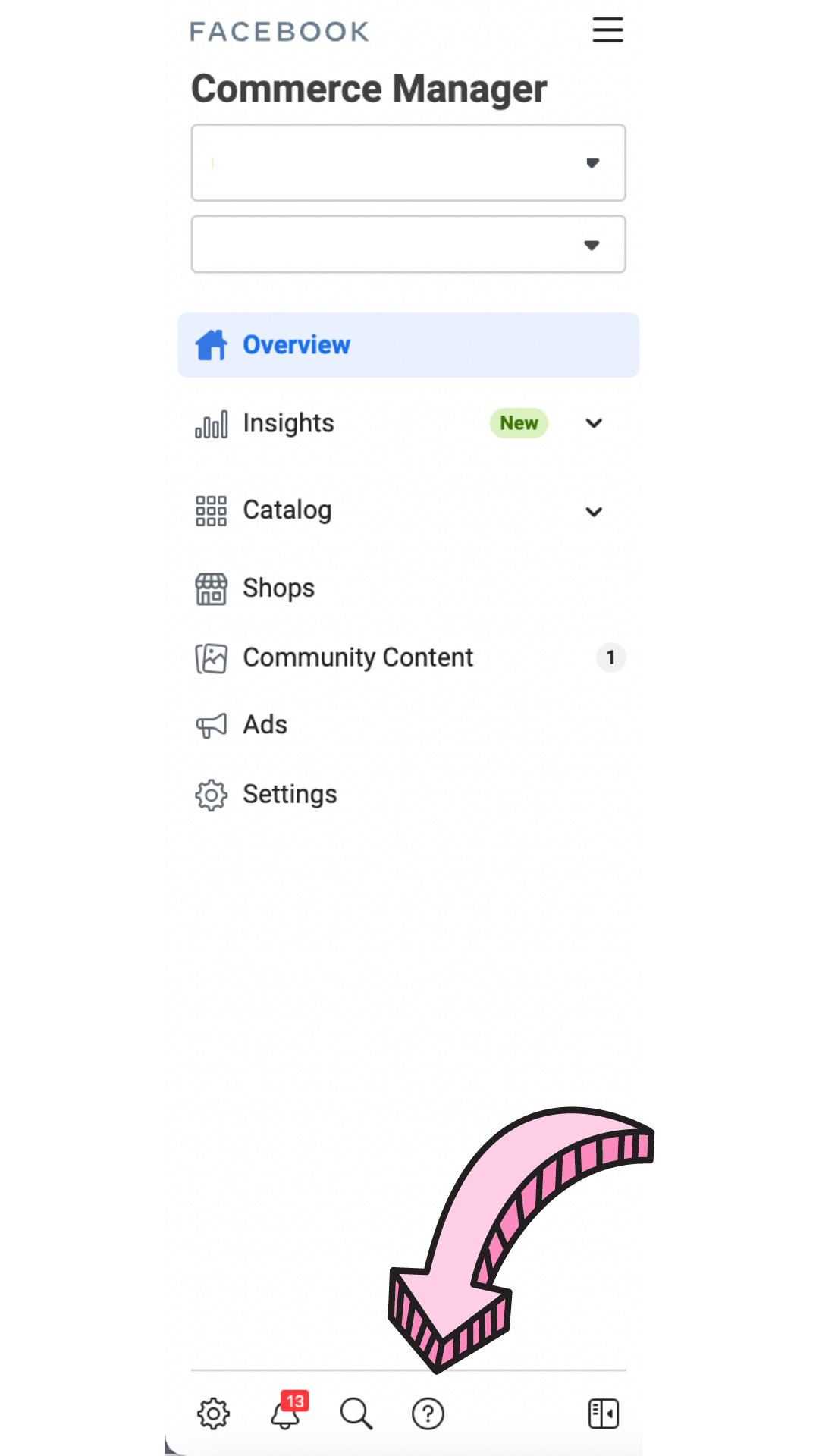
To contact Facebook Chat tap the question mark icon at the bottom of the left hand menu column
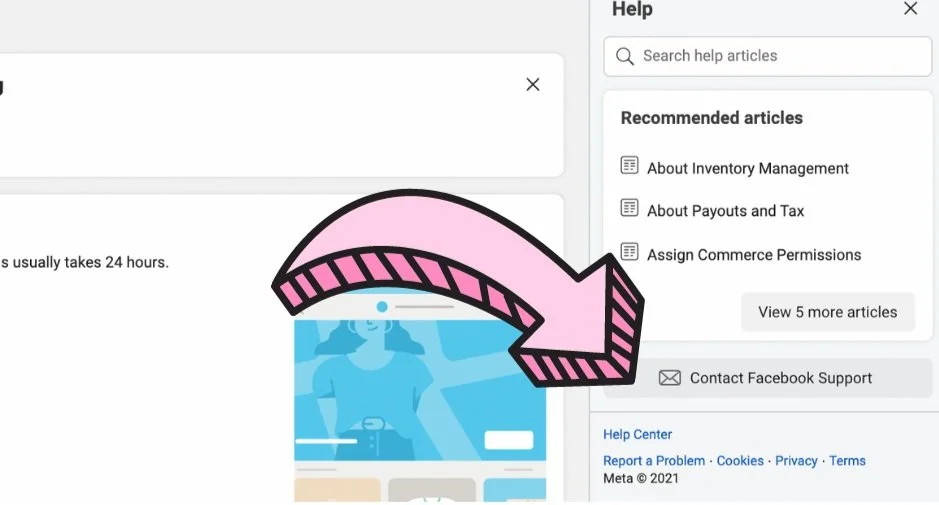
A ‘Help’ column will then appear on the right hand side with a ‘Contact Facebook Support’ Button. Press this and fill in the required information to begin your Messenger Chat.
If everything is in order and you have a proven track record for trustworthiness on both Facebook and Instagram platforms, you should eventually be approved. Shop approval can require perseverance for some accounts but hang in there as the benefits of this game-changing feature are so worth it!
Good luck and let me know how you get on!
If you are still struggling to set up your Instagram Shop and need an expert to look over your application then I offer an Instagram Shop Set-Up Service. Head to My Services page and buy the 60-minute session where we will check over how your Commerce account is set up and make tweaks to help steer you towards a successful Shop application.
Marielle x